Reservation Management

Everything after Book Now.

Reservation Management Built for Today’s Cruise Operations

Cabin Select’s Reservation Management Suite gives cruise lines complete control over every stage of a reservation — from the moment a booking is placed on option through payment, confirmation, amendments, documentation, cancellation and reporting.

Cabin Select Administration Suite
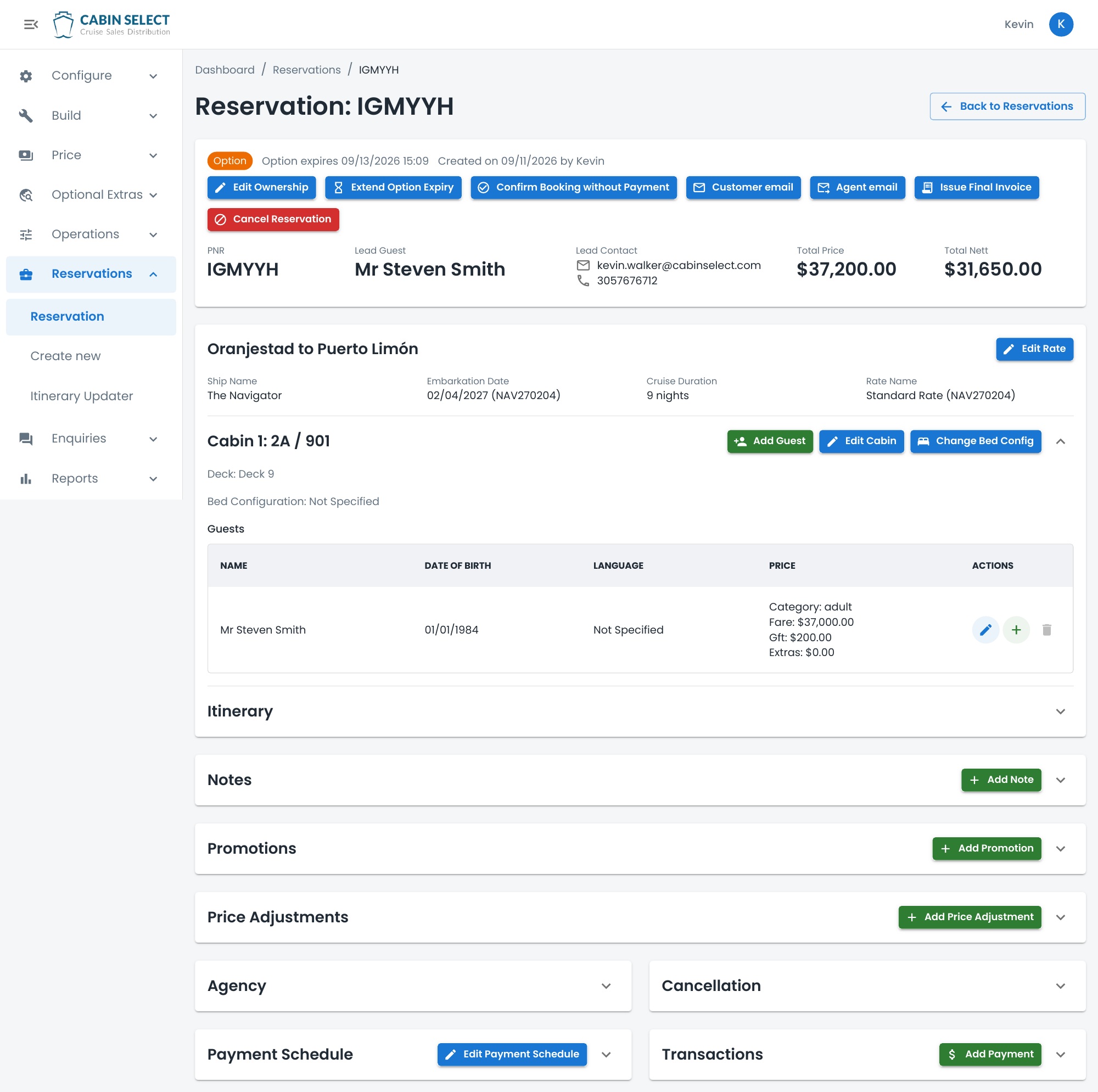
Cabin Select reservation administration screen showing booking status, sailing, guests, cabin details, pricing, payment schedule and reservation management actions.
View the full-size administration screen (opens in a new tab)

Designed specifically around the operational requirements of cruise, the platform brings guest information, cabin details, itinerary, pricing, promotions, payment schedules, transactions, agency information and booking history together within a single reservation view.

Your reservations team can quickly understand the status of a booking and act without moving between multiple systems or relying on manual processes.

Clarity at every stage

Complete Booking Lifecycle Management

Every reservation is clearly tracked through its lifecycle using Confirmed, Option, Void and Cancelled booking statuses.

Option

An Option is a reservation being held for a defined period while awaiting the required payment or confirmation. The expiry date is clearly displayed to the reservations team and, where required, authorized staff can extend the option period or confirm the booking without taking immediate payment. The administration screen shown, for example, displays the option status and expiry alongside actions to extend the option or confirm without payment.

Confirmed

A Confirmed reservation has met the predefined confirmation requirements, such as receiving the required minimum payment. Internal teams can also manually confirm a reservation without payment where appropriate. Importantly, doing so does not remove the outstanding balance — the original payment schedule and amount due continue to be tracked.

Void

A Void reservation is an option booking that has automatically expired because the required payment or confirmation was not received within the permitted timeframe. Rather than losing visibility of the booking, authorized users can search for void reservations and reinstate them when required.

Cancelled

A Cancelled reservation is a previously confirmed booking that has subsequently been cancelled. Applicable cancellation terms can be viewed and used to recalculate the booking based on the cruise line’s configured cancellation rules.

These statuses provide operational clarity while also feeding into administration views and reporting, giving management greater visibility of confirmed business, outstanding options, expired bookings and cancellations.

Built for change

Make Changes Without Rebuilding the Reservation

Cruise reservations rarely remain unchanged between initial booking and departure. Cabin Select has been designed around that reality.

Authorized users can amend an existing reservation directly from the administration suite, including:

Rates & Promotions

Move a reservation to a different or newly available promotional rate and automatically reprice the booking. Promotions and individual price adjustments can also be applied where required.

Guests

Add, remove or amend guest information and allow the reservation to be repriced based on the updated occupancy — for example, when changing from single to double occupancy.

Cabins & Bedding

Amend cabin information and update the required bedding configuration.

Payments

Take live customer payments, record payments received outside the platform and manage the booking's payment schedule.

Refunds

Refund eligible live customer transactions directly through the reservation management process.

Commission

Review or amend applicable commission and commercial arrangements.

Notes

Add internal reservation notes to maintain a clear operational record.

Documentation

Reissue customer or travel agent documentation to multiple email addresses and generate final invoices.

Cancellation

View applicable cancellation terms, cancel a reservation and calculate the resulting charges based on the configured cancellation policy.

Transaction History

Maintain visibility of the financial activity associated with the reservation.

The reservation screen itself is designed to make these actions immediately accessible, while keeping the underlying sailing, rate, cabin, guest and pricing information visible to the user.

Itinerary Updater

Powerful Itinerary Management for Operational Disruption

When an itinerary changes, updating reservations individually can quickly become an enormous operational task.

Cabin Select includes an Itinerary Updater that allows cruise lines to make itinerary changes across all applicable bookings on a sailing rather than manually updating each reservation individually. The Itinerary Updater is available directly within the reservation administration area.

This can be particularly valuable for river cruise operators, where low or high water levels, port restrictions and other operational factors can require changes to multiple ports or an entire itinerary at short notice.

Once the sailing has been updated, affected reservations can be updated and revised documentation issued to customers and travel agents — dramatically reducing the administrative workload associated with itinerary disruption.

Financial control

Payments, Balances & Financial Control

Reservation teams have a clear view of the commercial position of each booking, including the total selling price, applicable net value, payment schedule and transaction history.

Depending on their permissions, users can take live payments, receipt manually received payments, process refunds, modify payment schedules, apply price adjustments and manage commission.

This means an exceptional booking does not need to be handled outside the reservation platform simply because its payment arrangements differ from the standard rules.

Connected group information

Group Reservations — Without Losing the Individual Booking

When a reservation forms part of a group or charter, users can access the relevant group information directly from the reservation.

This allows the reservations team to understand the individual booking in the context of the wider group while continuing to manage the guests, cabins, pricing, payments and documentation at reservation level.

One connected platform

Everything Your Reservations Team Needs, In One Place

From a single reservation, authorized users can manage the booking status, guests, cabins, rates, promotions, pricing, itinerary, bedding, notes, agency details, cancellation terms, payment schedule, transactions and documentation.

The objective is simple: give cruise line teams the flexibility to handle real-world reservation scenarios without creating manual workarounds outside the platform.

Whether it is extending an option, reinstating an expired booking, changing a guest, moving a customer onto a new promotional rate, taking a payment, managing an itinerary disruption or cancelling and repricing a reservation, Cabin Select keeps the complete booking lifecycle within one connected platform.

Built for cruise. Built for change. Built for the teams managing every booking after the “Book Now” button has been clicked.

Let’s Talk